GO AT THE CORE OF YOUR MOBILE APP
Write a Go web app. Ship it as a phone app. No server. No JavaScript framework.
Zero to phone
One command makes an app. One runs it in your browser with live reload. One puts it on a phone.
No Gradle files to edit, no Java to write, no JavaScript framework to learn. The CLI finds your Android toolchain, compiles your Go with gomobile, wraps it in a Capacitor shell and installs it.
From mobigo new to the app running on an emulator: about 20 seconds.
$ mobigo new hello
▸ Creating hello
▸ Fetching dependencies

$ cd hello && mobigo dev
mobigo dev: Hello (bridge) on http://127.0.0.1:8080/

$ mobigo run android
▸ Generating Go glue
▸ Compiling Go for Android (gomobile bind)
▸ Bundling web assets
▸ Building APK (Gradle)
▸ Built app-debug.apk (13.8 MB)
▸ Launching Hello
[bridge] GET / -> 200
[bridge] POST /tap -> 200
How it works
- You write an ordinary Go web app:
net/http,html/template, htmx attributes, a little Alpine for UI-only bits. - On the phone,
mobigo.jscatches every htmx request and hands it to Go as one message. No socket, no server, no port. - Your handler runs on the device: SQLite, crypto, validation, all in Go. It answers with HTML.
- Need the phone itself? Set an event from Go (
mobigo.Haptic(w, …)) and the native plugin fires.
func New(env mobigo.Env) (*mobigo.App, error) {
    mux := http.NewServeMux()

    mux.HandleFunc("POST /tap", func(w http.ResponseWriter, r *http.Request) {
        taps := counter.Add(1)      // runs on the phone
        mobigo.Haptic(w, mobigo.HapticLight)
        mobigo.Toast(w, "Nice tap!")
        templates.ExecuteTemplate(w, "taps", taps)
    })

    return &mobigo.App{Handler: mux, Static: static}, nil
}
It's just Go
A MoBiGo app is an http.Handler. Use the standard library, chi, or whatever router you like.
The same handler runs in three places: your browser during mobigo dev, the phone, and your tests.
func TestTap(t *testing.T) {
    phone := mobigotest.New(t, New)
    res := phone.Post("/tap", nil)
    // same bridge as the device
}
Why MoBiGo
NO NETWORK HOP
Go runs on the device. Taps are answered in-process, and the app works offline by default.
ONE CODEBASE
Share packages between your phone app and your server. Write a business rule once.
HTML OVER THE WIRE
No JSON client models to keep in sync. Go renders; htmx swaps.
TESTS THAT MEAN IT
mobigotest drives your app through the real bridge, in plain go test.
NATIVE VIA EVENTS
Haptics, camera and more through Capacitor plugins, triggered from Go with one call.
LIVE RELOAD
mobigo dev rebuilds on save and the page reloads itself.
Real apps, real phones
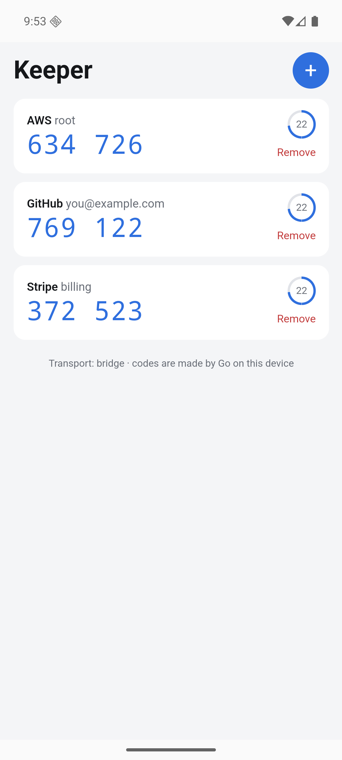
KEEPER: A 2FA APP IN GO
The flagship example. Time-based codes (RFC 6238), SQLite storage, and QR scanning, where the camera frames are decoded by Go on the phone.
About 530 lines of Go, plus 130 lines of browser-only JS for the countdown, clipboard and camera.
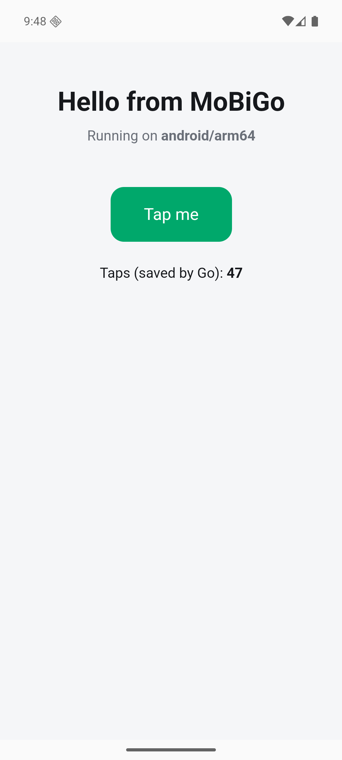
HELLO: THE STARTER
What mobigo new gives you: a page, a button, a counter Go saves to disk, a toast and a haptic tap, and a test.
Screenshots: Android 16 emulator, tinted for this screen.
Roadmap
- Go runtime + in-process bridge
- CLI: new · dev · build · run · doctor
- Android
- Test client through the bridge
- iOS
- Push from Go to the page
- Files over the bridge
- Secure storage (Keychain / Keystore)
- Component kit (templ)
- Release builds + signing
Get it
$ go install mobigo.codenexis.com/cmd/mobigo@latest
$ mobigo doctor
$ mobigo new hello
Needs Go, Node, Java 21 and the Android SDK. mobigo doctor tells you what's missing. Full setup →